A crypto link lands in your group. You delete it and ban the account. Four minutes later the same link is back, from a different name — a profile created last Tuesday with no photo and no history. Then a third. This is the part most admins discover the hard way: you're not dealing with one spammer, you're dealing with a list.
What telegram links spam actually is
Someone searching spam links telegram group has almost always just been hit. Telegram link spam runs on volume: one operator, one payload, dozens of chats. The links are the visible part — fake airdrops, "earn $300 a day", phishing pages dressed up as Telegram Premium, adult bait. The mechanism behind them is what matters.
Roughly nine times out of ten the link doesn't come from a real member who got compromised. It comes from a disposable account — created or bought in bulk, joined for the sole purpose of posting once and moving on. The same account is hitting your group and forty others on a schedule — these operators spam Telegram groups by the batch, not one at a time. That single fact decides how you fight it: you're not moderating a person, you're filtering a supply of accounts.
The wording people use for it varies more than the problem does — links spam telegram, spam link telegram, telegram link spam group — and they all describe the same run. Worth saying plainly, because the phrasing sends people to different articles: a single spam link Telegram won't catch on its own is not the issue. The issue is the twentieth one from the twentieth throwaway account, arriving in the same ten minutes.
There's a second thing the phrasing hides. Dedicated Telegram spam groups exist — chats whose entire purpose is trading links and coordinating runs, where operators buy account batches and swap target lists. Your group isn't being picked on; it's on a list, alongside the other forty. That's also why banning one account changes nothing: the list stays.
One thing to separate first. If hundreds of bots are silently joining through your public invite link instead of posting URLs, that's an invite-link flood — a different problem with a different fix. See Telegram group security: invite-link bot floods. This page is about links showing up as messages in the chat.
Why Telegram's built-in tools don't hold
Telegram gives you three blunt instruments, and each one breaks against a real campaign.
- Disable links in Group Permissions. It works, in the sense that nobody can post a URL anymore — including your actual members sharing something useful. And spammers route around it with
@usernamementions,t.medeep links, or a URL split across a line with the word "dot". - Native Aggressive Anti-Spam. Available for supergroups over 200 members. You can't see how it decides, you can't tune it, and it has a habit of eating messages from genuine members while a determined operator with aged accounts slips through.
- Delete and ban by hand. Fine for one stray spammer. Useless when 30 accounts post the same link inside five minutes — by the time you've banned the third, the tenth is already up.
The t.me spam links workaround, and @mentions
Turn links off and the next batch stops posting https:// URLs entirely. They post t.me/joinchat deep links and bare @username mentions instead. Those t.me links spam the chat exactly like a URL would, but Telegram treats them as native navigation, not as "links" the permission covers. A keyword filter watching for http sees nothing go by. That's why t.me spam links keep landing in groups that already switched link-posting off: the group blocked one format, the run switched to the next.
Small note on searching for this, since it costs people time: the dot gets dropped constantly, so t me spam links and t me links spam mean the same thing as the version with it. Telegram's own deep links are t.me, and that's the string a filter has to match — t me with a space matches nothing, which is one more reason keyword filters lose this fight.
Filtering by account sidesteps the whole format game. An account that never cleared the captcha can't post a URL, a t.me link, an @mention, or anything else — it isn't in the chat to post at all. You stop guessing which string the spammer tries next week.
The fix is the account, not the message
Here's the honest version most "10 ways to stop spam" posts skip: deleting the message is treating the symptom. Every link that lands in your chat was posted by an account that was allowed to be there and allowed to send. Take away either permission and the link never appears in the first place.
And the accounts that post link spam are not subtle. They share a signature: joined minutes ago, empty profile, first-ever message contains a URL, and — the giveaway — they arrive in a cluster with a dozen siblings. You don't need to read the message to know what it is. You can tell from how the account got in.
A link-spam run is 20–50 throwaway accounts hitting your group in a few minutes. Block them at the door and there's no message left to delete.
How TGuard stops it
TGuard starts at the account layer, before anything is written — it watches who gets in and how fast. Three things do the work there, and for most groups they're enough on their own:
A captcha at the entrance. Every new member has to pass a challenge before they can post. A bought account running through an automation script doesn't solve it and never reaches the chat. That alone removes the cheapest tier of link spam.
A join-rate limit on bursts. Link-spam batches join the way they post — all at once. TGuard lets you set a threshold (say, more than 10 joins in 30 seconds) and acts on the whole burst automatically, ban or kick, your choice. The coordinated run that would have dropped twenty links gets cleared before the first one posts. This is the same mechanism that stops raids.
Cleanup for what's already inside. Spammers already inside? TGuard scans the member list and removes the bot accounts in bulk — no banning them one message at a time.
For a long time that was the whole answer, and it left one gap: a link posted by a genuine, long-standing member. The account layer has nothing to say about that account — it passed the captcha months ago, it joined alone, it belongs there. So we built the second layer.
The new content layer: a rule that deletes links on sight
TGuard now runs a separate anti-spam engine that judges messages, not just accounts. It's off until you turn it on, and every rule is set per chat. "No links at all" is right for an announcement channel and wrong for a dev group that trades GitHub URLs all day.
Every rule carries its own reaction, picked from four: off, log only, delete, delete and ban. Stop words go further — the reaction is set per word, so crypto can delete while join us! only logs until you've seen what it catches.
- Links. Any link at all. It catches
https://andwww., thet.me,telegram.meandtelegra.phpaths that link-blocking in Group Permissions ignores, and bare domains typed without a scheme. Bare domains count only against a list of real endings:.com,.ru,.io,.xyz,.top,.рфand about twenty more. Without that list, everymin.jsandfile.txtin a technical chat would read as a link. - Stop words. Your own list, up to 500 per chat, matched as a substring or as a whole word. Substring catches airdrop inside airdropbot; whole-word keeps cash from firing on cashew. Each word can carry a note and be disabled without losing it.
- Frequency. More than N messages from one sender inside a window — 5 per 10 seconds out of the box, tunable up to 1000 per hour. This rule runs first and counts every message, even the ones another rule is about to kill, so the counter never undercounts.
- Known abuser. The bot already knows which accounts abused your other chats. Whether that alone is spam is your call per chat: for one owner it's an instant ban, for another it's a line in the log.
The engine sees every message, not a sample — that was the design constraint, not a nice-to-have. In a container it clears roughly 230,000 events per second with 10,000 stop words spread across 200 chats, so there's no reason to check only the suspicious ones. Every hit lands in a log you can read: sender, rule that fired, and the message itself, kept even when the reaction was log only. That's the part worth using first — you find out what the rule would have deleted before you let it.
Settings live on their own page, one stable URL per chat. The address is an encrypted source:chatId: safe to bookmark, safe to pass to a co-admin, and a mangled one returns 404 instead of someone else's chat. A word you add applies to the very next message.
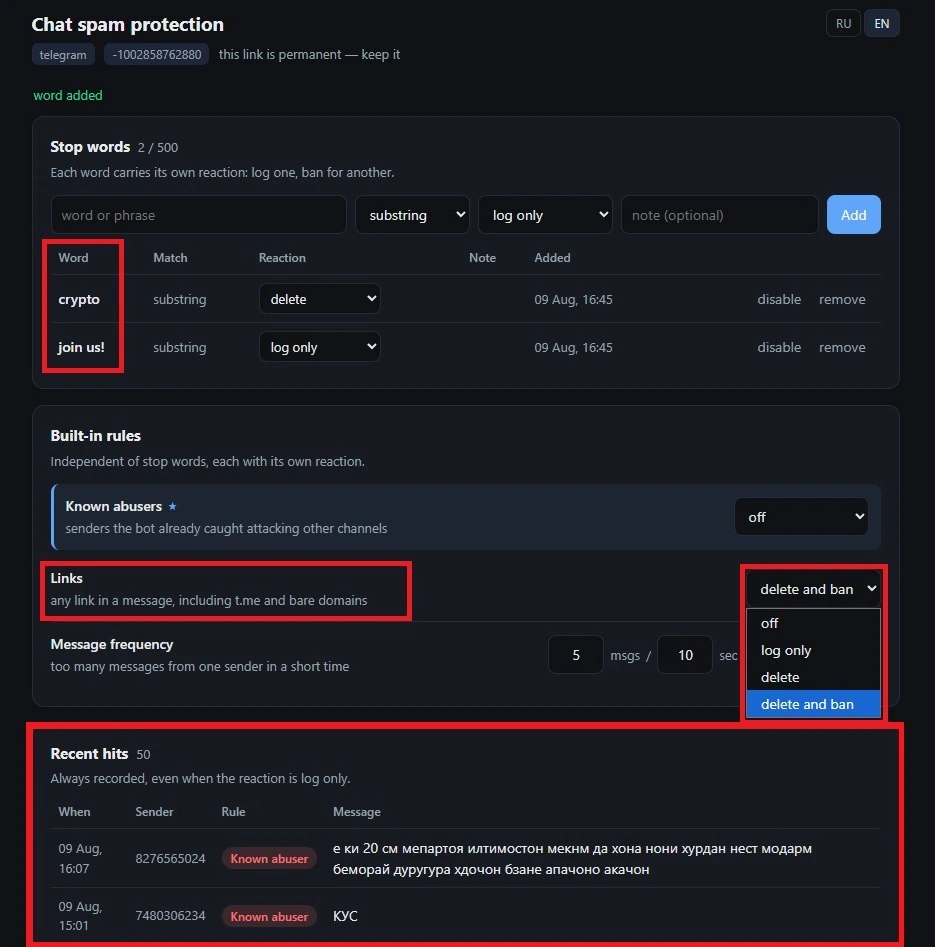
One honest caveat about the link rule: it's a blunt instrument by design. Turn it to delete and your own members lose the ability to share a URL too — same trade-off as Telegram's permission, except you get t.me coverage and a log of what was removed. In most groups the sane setup is simple: account layer on, link rule on log only for a week, stop words doing the actual killing.
Links are only one shape spam takes. Sticker floods, emoji walls and premium-emoji ads each dodge a different filter and need their own rule — the full set is in how to stop spam in a Telegram group.
Setting it up
- Open @channel_guardian_bot and add it to your group as an admin with ban rights.
- Turn on captcha so every new member is challenged before they can post.
- Go to Security and set a join-rate limit — a time window and a member count that fits your normal growth.
- Choose the action for a tripped limit: ban or kick.
- If spam accounts are already inside, run a scan and clear them.
- Open the chat's spam-protection page and set the links rule to
log only. Leave it a few days, then read the recent-hits log before you let it delete or ban anything. - Add the words your spammers actually use to the stop-word list — the payload repeats far more than the account does.
Link spam feels like a content problem because the link is what you see. It's an access problem. Close the door the throwaway accounts come through and the chat stays clean without you watching it.
Frequently Asked Questions
Stop the accounts, not the messages. Link spam is posted by throwaway accounts that join, post, and leave. A captcha at entry blocks accounts that can't pass it, and a join-rate limit kicks the coordinated bursts these runs arrive in. Once the spamming accounts can't reach the chat, the links stop appearing.
Partly. You can disable links for everyone in Group Permissions, but that also kills legitimate sharing and spammers switch to @mentions or obfuscated URLs. Telegram's native Aggressive Anti-Spam exists for supergroups over 200 members, but it can't be tuned and produces false positives on real members.
Because one operator runs many accounts. A link-spam campaign uses 20–50 disposable accounts that hit dozens of groups with the same payload in a short window. Banning one account does nothing — the next message comes from the next account in the batch. You have to block the batch at the point they join.
Disabling links only blocks http URLs. Spammers switch to t.me deep links and @mentions, which Telegram treats as navigation, not links, so a keyword filter never sees them. The reliable fix is account-level: a captcha and a join-rate limit keep the disposable accounts out, so nobody is in the chat to post any link format.
Yes, and TGuard does both halves. Its anti-spam engine can delete any message containing a link — including the t.me and telegra.ph forms Group Permissions ignores — with the reaction set per chat to log only, delete, or delete and ban. But deletion alone stays reactive: the next account in the batch reposts seconds later. That is why the account layer runs first, keeping the disposable accounts out so there is nothing to delete.