The account you're about to ban joined nine minutes ago. Its first message is a sticker pack — twelve stickers, back to back, each one an ad for a casino channel. You clear them, and before you've finished, another new name drops a wall of emoji, then a third posts a line of text that looks harmless until you notice the "letters" are premium emoji linking somewhere else. Three accounts, three completely different payloads, and not one of them is a link.
This is what searching telegram spam group usually means in practice: not one problem with one fix, but a handful of message types that each need shutting down a different way. The link filter everyone reaches for first covers maybe a third of it.
Spam is a message type, not just a link
It helps to stop thinking of "spam" as one thing. In a real group it arrives in shapes, and each shape dodges a different blind spot:
- Sticker floods. A dozen stickers in a row, usually advertising another channel. Telegram counts a sticker as an attachment, not text, so a keyword filter never sees it.
- Emoji walls. A first message that's forty emoji and nothing else, or a single oversized one repeated by a joined-in cluster. No words to match, no link to block.
- Premium-emoji ads. The nastiest of the lot. A premium emoji shows one picture but travels in the text as an ordinary placeholder character — your eyes see an ad, a stop-word filter sees a shrug.
- Repeat floods. One account, the same line six times in ten seconds. Every copy is "clean" on its own; only the rate gives it away.
- Hidden links. The address tucked behind a word like "here" so nothing that looks like a URL is ever visible in the chat.
- Media dumps. A burst of images or forwarded videos where the group expects words.
Plain link spam is its own well-worn category, and if that's mostly what you're fighting, the deep version lives in how to stop Telegram spam links in a group. Everything above is what that article doesn't cover — and what Telegram's own tools quietly ignore.
Why Telegram's built-in tools leave gaps
Telegram gives a group owner three things, and each one runs out early. Group Permissions can switch off links, stickers, or media for everyone — which also punishes the members you want. Native Aggressive Anti-Spam kicks in for supergroups over 200 members, but it's a black box: you can't see its reasoning, can't tune it, and it has no opinion at all about a member who floods the same line thirty times. And banning by hand is fine until three accounts with three different payloads show up inside a minute.
The gap isn't that Telegram does nothing. It's that a group needs to treat each spam type on its own terms — allow stickers but not links here, block emoji-only messages there — and the native controls only do all-or-nothing.
One rule per type, one reaction per rule
TGuard runs a separate anti-spam engine that judges messages rather than accounts. It stays off until you switch it on, and every rule is set per chat. That per-chat scope is the whole point: "no stickers" is right for a support group and wrong for a meme chat, and you shouldn't have to choose one policy for both.
Each rule carries its own reaction, chosen from four levels:
- Off — the rule isn't watching.
- Log only — it records the match but touches nothing. This is where every new rule should start.
- Delete — the message goes, the sender stays.
- Delete and ban — the message goes and the account is gone.
Stop words go one level finer: the reaction is set per word, so casino can ban on sight while free only logs until you've watched what it catches. That difference matters more than it sounds — it's the gap between a filter you trust to act alone and one you're scared to turn on.
The engine reads every message, not a sample — around 230,000 a second in testing — so there's no reason to check only the ones that look suspicious. Everything gets judged, and everything that matches gets logged.
What each rule actually catches
Here's the working set, in the order most groups end up using them.
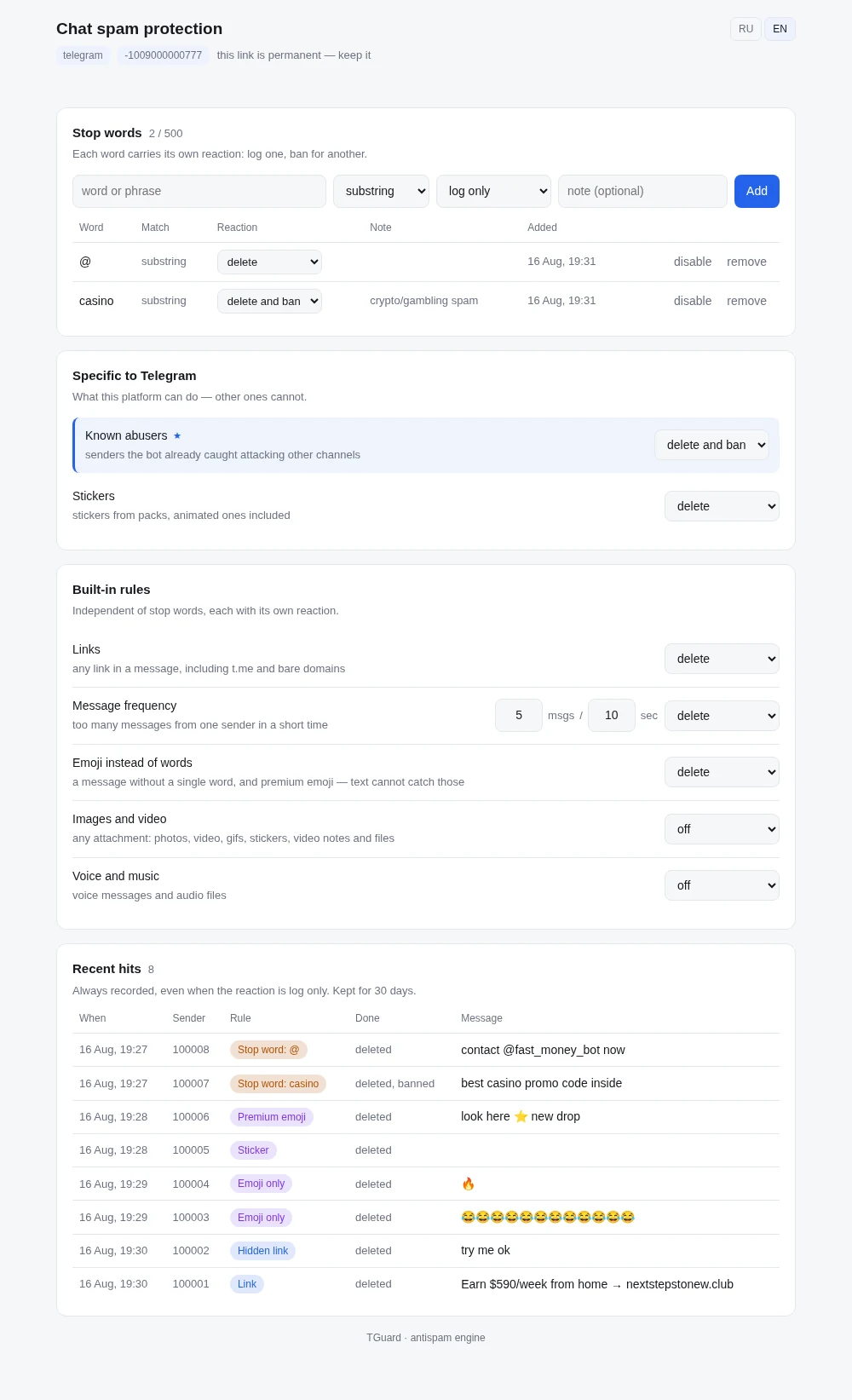
Stop words. Your own list, up to 500 per chat, matched as a substring or a whole word. Substring catches airdrop hiding inside airdropbot; whole-word keeps cash from firing on cashew. Each word can carry a note and be switched off without deleting it, so you never lose a rule you spent time tuning.
Links, including the hidden kind. Any link at all — https://, www., the t.me and telegra.ph paths Group Permissions ignores, and bare domains typed without a scheme. It also catches the link tucked behind a word so no URL is ever visible in the chat. The link sub-topic runs deep enough to have its own guide.
Message frequency. More than N messages from one sender inside a window — five per ten seconds out of the box, tunable up to a thousand an hour. This one runs first and counts every message, even the ones another rule is about to delete, so the flood counter never comes up short.
Stickers. A sticker is its own message type here, split out from photos and video on purpose. A chat that's fine with images can still shut down sticker-pack advertising without touching the members who post screenshots.
Emoji instead of words. This fires on a message that is nothing but emoji — a single giant one, a wall of forty, a flag, a keycap, the composed family-and-skin-tone kind that's really a stack of hidden characters. It leaves ok 👍 alone; it kills the emoji-only reaction floods. And it folds in premium emoji, which carry an ordinary placeholder in the text and would otherwise walk straight past every word filter.
Media and audio. Two separate switches, because a chat that bans image dumps often has no problem with voice notes, and the reverse. The rule looks only at the fact of an attachment and its type — nobody opens the file.
Known abuser. The bot already knows which accounts abused your other chats. Whether that alone counts as spam is your call per chat: an instant ban for one owner, a line in the log for another.
Read the log before you let it bite
The single most useful habit is boring: turn a new rule to log only and leave it for a few days. Every hit lands on a page you can read — the sender, the rule that fired, what the reaction did, and the message itself, kept even when nothing was deleted. You find out what a rule would have removed before you trust it to remove anything, which is how you catch the false positive that would have banned a regular for an enthusiastic run of emoji.
Settings live on their own page, one stable link per chat, safe to bookmark or hand to a co-admin. A word you add applies to the very next message — there's no wait, no redeploy.
Setting it up
- Open @channel_guardian_bot and add it to your group as an admin with the right to delete messages and ban.
- Open the chat's spam-protection page from the bot's menu.
- Switch on the rules that match your problem — stickers and emoji for reaction floods, frequency for repeat-floods, links for URL spam.
- Set every new rule to
log onlyfirst. Don't skip this. - After a few days, read the recent-hits log. See what each rule caught and what it would have removed.
- Move the rules you trust to
deleteordelete and ban, and add the exact words your spammers repeat to the stop-word list.
Spam feels like something you have to sit and watch for because the payload keeps changing shape. It doesn't have to be. Give each shape its own rule, let the log show you what's real, and the group polices itself while you do something else.
Frequently Asked Questions
Give each kind of spam its own rule. TGuard's anti-spam engine watches every message and can act on links, stop words, message frequency, stickers, emoji-only messages, premium emoji, media and audio. Each rule has a reaction you set per chat — log only, delete, or delete and ban — so the group stays clean without you reading every message.
Only partly. Aggressive Anti-Spam exists for supergroups over 200 members, but you can't see how it decides or tune it, and it misses whole categories — sticker floods, emoji walls, premium-emoji ads. It also has nothing to say about a repeat-flood from one member. A configurable engine that judges each message type separately fills those gaps.
Turn on the sticker rule and the emoji rule. TGuard treats a sticker as its own message type, so a chat that allows photos can still block sticker packs. The emoji rule fires on a message that is nothing but emoji — including a single huge one — and catches premium emoji too, which read as ordinary text and slip past keyword filters.
Yes. Set the reaction for each rule to delete, or delete and ban, and TGuard acts the moment a message matches — no manual moderation. Start each new rule on log only for a few days: every match is recorded with the sender and the message, so you see exactly what the rule would have removed before you let it act.
Only if you set it that way. Every rule is off until you turn it on and scoped to one chat, so a link rule that's right for an announcements group stays off in a dev chat that shares URLs all day. The log-only reaction lets you watch a rule for a week before it deletes anything, which is the honest way to tune out false positives.